
ai writing
Ash Can Write to Your Manuscript Now. It Asks First.
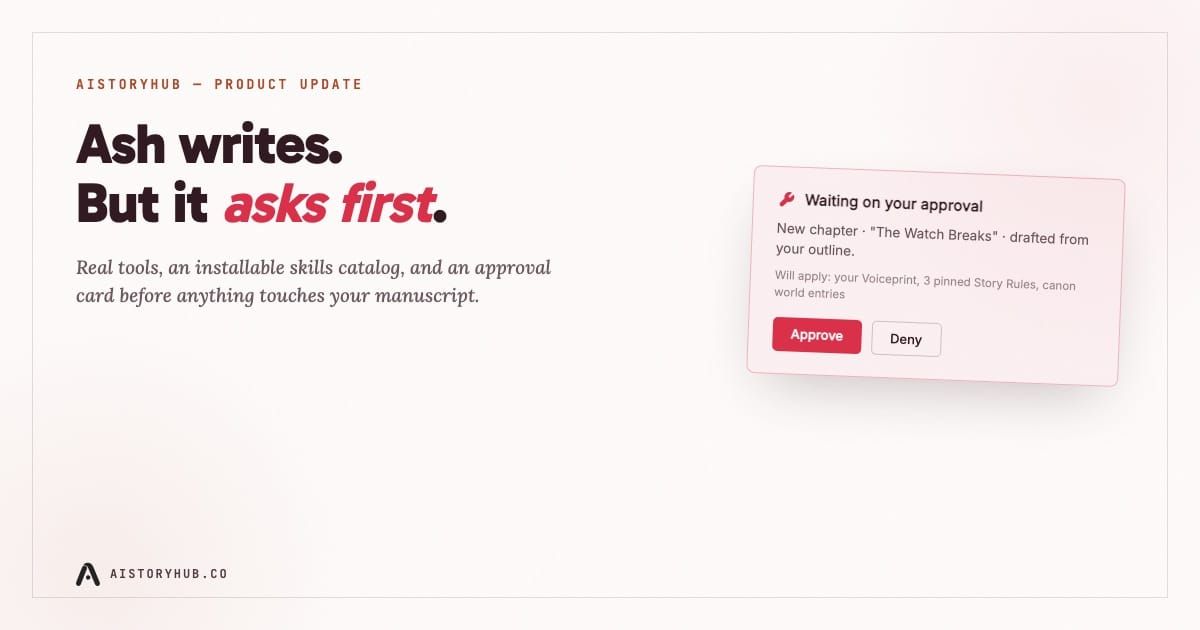
Type "run Continuity Keeper on chapter 12, then draft the next scene" into Ash chat today, and three things happen before a single new word lands in your manuscript. Ash reads the chapter. It checks your world entries for anything the scene contradicts. Then it stops and shows you a card: a new chapter, working title "The Watch Breaks," built from your Voiceprint, three pinned Story Rules, and the canon it just checked. Two buttons. Approve, or deny. Nothing gets written until you click one.
That pause is the whole point of what we shipped.
Most tools that call themselves "AI writing agents" mean one thing in practice: the model can now edit your file without you clicking a button first. That's a real capability, and also a real risk in a manuscript you've spent eight months on. We built the capability. We didn't build the risk. Ash now has eighteen real tools it can call from chat, not a fixed menu of three buttons, and by default it can't touch a word of your prose without asking.
What actually changed
Ash used to be a generation engine wearing a chat interface. Generate PRO wrote a chapter. Revise rewrote a passage against an instruction. Human Grit Pass roughened up prose that read too smooth. All three still exist, and all three now sit inside something bigger: Ash can create and update chapters, manage your characters and locations, run an editorial pass, and score a passage against 758 known AI clichés, each as an individual tool call it reaches for mid-conversation instead of a button you have to find.
The tool list breaks into five groups. Manuscript tools create, update, list, and read chapters. Story bible tools do the same for characters, locations, factions, items, and lore. Prose tools generate, revise, roughen, and grade text, including a self-check that runs the same slop-detection corpus behind our public Slop Checker against Ash's own output before it shows you anything. A planning tool keeps a durable to-do list per story, so a five-step request survives across turns instead of Ash forgetting step three by the time it finishes step one. And a memory system, four kinds (preference, feedback, context, reference), lets you tell Ash something once and have it stick: global across your account, or scoped to one story.
None of that is abstract. Ask Ash to fix every instance of a character's inconsistent eye color across twelve chapters, and it lists chapters, reads each one, calls update_world_entry once on the character record, and works through the manuscript with a visible trail of what it touched and why. You watch it happen. You didn't have to do it by hand, and you didn't have to trust a black box either.
The part that isn't a feature so much as a bet
Here's the design decision that mattered more than any individual tool: by default, the model doesn't even see the tools that write. Ask Ash to draft a new chapter and, with approval gates on (the default for every story), it doesn't get access to create_chapter or generate_prose at all. It gets one substitute tool, propose_manuscript_draft, whose only job is to describe a plan and put a card in the chat. The card names what's about to be written, a new chapter or a specific existing one, and a line reading "Will apply:" followed by exactly which Voiceprint, which Story Rules, which canon entries will shape the draft. You approve it, and only then does the real write happen.
We went back and forth on whether this was over-engineering a checkbox nobody would read. It isn't a checkbox. It's a structural fact about what the model is allowed to do, not a confirmation dialog bolted onto a write that was going to happen regardless. Withholding the tool is a different guarantee than asking permission after the tool already ran. If you want speed over ceremony, there's an Auto-approve toggle in the Ash Tools panel that flips this off entirely and lets Ash write immediately, the same way plenty of writers will prefer once they've built trust with it over a few chapters. Both are one click away. Neither is the wrong choice.
Skills: instructions, not code
Alongside the built-in tools, we shipped an installable skills catalog. A skill is a block of prose instructions, not a plugin or a script, that tells Ash how to use the tools it already has for one specific job. Seven ship today. Editor-in-Chief runs a line-level pass, trims flab, tightens dialogue tags, and explicitly will not touch your story bible or draft new scenes. Continuity Keeper cross-checks your manuscript against your world entries and reports contradictions, read-only, no fixes of its own accord. The Tell rewrites AI-cliché prose against the same corpus that powers self_check. Voice Coach judges a chapter against your pinned voice print.
Structural Pass looks at pacing and beat placement and never edits a sentence directly. Drafting Partner is the only skill of the seven allowed to draft an entirely new scene, and even it won't invent a world entry, it flags missing canon and waits for you to fill it in. Cold Reader reads chapter by chapter as a first-time reader would, reporting confusion and predictions without looking ahead or consulting the story bible at all.
Every one of those skills declares, in writing, what it will not do. That's not a legal disclaimer. It's the actual mechanism keeping a "just check continuity" request from quietly turning into a rewrite you didn't ask for. Install one from the Ash Tools panel, in the middle of a chat, and it applies starting your very next message. Uninstall it just as fast.
Where the memory fits in
The last piece is smaller, but it's the one that makes the rest feel less like starting over every session. Tell Ash once that you hate exclamation points in narration, or that a particular character's name is spelled with one L, and it remembers, across chats, across weeks, without you repeating yourself. That's not a settings toggle you configure once. Ash calls a remember tool the moment you correct it or state a clear preference, and re-reads everything relevant at the start of every turn, the same way it already re-reads your manuscript and story bible.
Try it
Open any story, click into Ash chat, and hit the wrench icon in the header. That's the Ash Tools panel: every built-in tool grouped the way they're grouped above, the auto-approve toggle, and the skills catalog with install and uninstall a click away. Ask it to do something that used to take three separate buttons and a fair amount of copy-pasting between your chapters and your world entries. Watch the tool trail. Read the approval card before you click it.
Full documentation- every tool, every skill, and exactly how the approval flow works- is in our docs.